
React-router及手写路由组件
资源:
React中文网:https://react.docschina.org/
react-router英文文档:https://reactrouter.com/web/guides/quick-start
react-router中文文档:http://react-router.docschina.org/
Router
1、BrowserRouter
<BrowserRouter>使用 HTML5 提供的 history API (pushState , replaceState 和 popstate 事件) 来保持 UI 和 URL 的同步。
basename: string
所有URL的base值。如果你的应用程序部署在服务器的子目录,则需要将其设置为子目录。basename 的格式是前面有一个/,尾部没有/。
<BrowserRouter basename="/kkb">
 <Link to="/user" />
</BrowserRouter>
上例中的Link最终将被呈现为:
<a href="/kkb/user" />2、HashRouter
<HashRouter> 使用 URL 的 hash 部分(即 window.location.hash)来保持 UI 和 URL 的同步。
basename: string
同上。
<HashRouter basename="/kkb">
 <Link to="/user" />
</HashRouter>
上例中的Link最终将被呈现为:
<a href="#/kkb/user" />注意:hash history 不支持 location.key 和 location.state。仍有一些边缘问题无法解决。因此任何依赖此行为的代码或插件都将无法正常使用 。
BrowserRouter与HashRouter对比
- HashRouter最简单,不需要服务器端渲染,靠浏览器的# 的来区分path就可以,BrowserRouter需要服务器端对不 同的URL返回不同的HTML,后端配置可参考:https://react-guide.github.io/react-router-cn/docs/guides/basics/Histories.html。
- BrowserRouter使用HTML5 history API( pushState, replaceState和popstate事件),让页面的UI于URL同步。
- HashRouter不支持location.key和location.state,动态路由跳转需要通过?传递参数。
- Hash history 不需要服务器任何配置就可以运行,如果你刚刚入门,那就使用它吧。但是我们不推荐在实际线上环境中用到它,因为每一个 web 应该都应该渴望使用 browserHistory。
3、MemoryRouter
把 URL 的历史记录保存在内存中的<Router>(不读取、不写入地址栏)。在测试和非浏览器环境中很有用,如React Native。
import { MemoryRouter } from 'react-routerdom';
<MemoryRouter>
 <App />
</MemoryRouter>
路由组件介绍
1、Link
属性 to (字符串类型)
一个字符串形式的链接地址,通过 pathname、search 和 hash 属性创建。
<Link to='/courses?sort=name' />属性 to (object 类型 )
一个对象形式的链接地址,可以具有以下任何属性
- pathname - 要链接到的路径
- search - 查询参数
- hash - URL 中的 hash,例如 #the-hash
- state - 存储到 location 中的额外状态数据
<Link to={{
 pathname: '/courses',
 search: '?sort=name',
 hash: '#the-hash',
 state: {
 redirect: '/login'
 }
}} />
属性 replace: (bool 类型 )
当设置为 true 时,点击链接后将替换历史堆栈中的当前条目,而不是添加新条目。默认为 false。
<Link to="/courses" replace />others
你还可以传递一些其它属性,例如 title、id 或 className 等。
<Link to="/" className="nav" title="a title">About</Link>2、Redirect
属性 to (字符串类型)
要重定向到的 URL,可以是 path-to-regexp:https://www.npmjs.com/package/path-to-regexp 能够理解的任何有效的 URL 路径。所有要使用的 URL 参数必须由 from 提供。
<Redirect to="/somewhere/else" />属性 to (object 类型 )
要重定向到的位置,其中 pathname 可以是 path-to-regexp 能够理解的任何有效的 URL 路径。
<Redirect to={{
 pathname: '/login',
 search: '?utm=your+face',
 state: {
 referrer: currentLocation
 }
}} />
上例中的 state 对象可以在重定向到的组件中通过 this.props.location.state 进行访问。而 referrer 键 (不是特殊名称)将通过路径名 /login 指向的登录组件中的 this.props.location.state.referrer 进行访问。
3、Route
可能是 React Router 中最重要的组件,它可以帮助你理解和学习如何更好的使用 React Router。它最基本的职责是在其 path 属性与某个 location 匹配时呈现一些 UI。
Route render methods
使用 <Router> 渲染一些内容有以下三种方式:
- component
- render: func
- children: func
在不同的情况下使用不同的方式。在指定的 <Router> 中,你应该只使用其中的一种。
属性 path (字符串类型)
可以是 path-to-regexp 能够理解的任何有效的 URL 路径。
<Route path="/users/:id" component={User} />没有定义 path 的 <Router> 总是会被匹配。
属性 location(object 类型)
一般情况下, <Router>尝试将其 path 与当前history location(通常是当前的浏览器 URL)进行匹配。但是, 如果您需要将 <Router> 与当前历史记录位置以外的位置相匹配,则此功能非常有用
4、Router
所有 Router 组件的通用接口。通常情况下,应用程序只会使用其中一个Router:
- BrowserRouter
- HashRouter
- MemoryRouter
- NativeRouter
- StaticRouter
5、Switch
用于渲染与路径匹配的第一个子 <Router> 或<Redirect> 。
这与仅仅使用 <Router> 系列有何不同?
<Switch> 只会渲染一个路由。相反,仅仅定义一系列 <Route> 时,每一个与路径匹配的 <Route> 都将包含在渲染范围内。考虑如下代码:
<Route path="/about" component={About} />
<Route path="/:user" component={User} />
<Route component={NoMatch} />
如果 URL 是 /about,那么 <About>、<User> 和 <NoMatch>将全部渲染,因为它们都与路径匹配。这是通过设计,允许我们以很多方式将<Route>组合成我们的应用程序,例如侧边栏和面包屑、引导标签等。
但是,有时候我们只想选择一个来呈现。例如我们在 URL 为 /about 时不想匹配 /:user(或者显示我们的 404 页面),这该怎么实现呢?以下就是如何使用 <Switch> 做到这一点:
import { Switch, Route } from 'react-router';
<Switch>
 <Route exact path="/" component={Home} />
 <Route path="/about" component={About} />
 <Route path="/:user" component={User} />
 <Route component={NoMatch} />
</Switch>
现在,当我们在 /about 路径时, <Switch> 将开始寻找匹配的<Route> 。我们知道, 将<Route path="/about"/>会被正确匹配,这时<Switch> 会停止查找匹配项并立即呈现。
<Fade>
 <Switch>
 {/* 这里只会渲染一个子元素 */}
 <Route />
 <Route />
 </Switch>
</Fade>

<Fade>
 <Route />
 <Route />
 {/* 这里总是会渲染两个子元素,也有可能是空渲染,这使得转换更加麻烦 */}
</Fade>
属性 location(object 类型)
用于匹配子元素而不是当前history location(通常是当前的浏览器 URL)的 location 对象。
如下例子,那这里就只匹配首页了。
<Switch location={{pathname: "/"}}>
 <Route exact path="/" component={HomePage} />
 <Route path="/user" component={UserPage} />
 {/* <PrivateRoute path="/user" component={UserPage} /> */}
 <Route path="/login" component={LoginPage} />
 <Route path="/children" children={()=> <div>children</div>} />
 <Route path="/render" render={() =><div>render</div>} />
 <Route path="/search/:id" component={searchComponent} />
</Switch>
children: node
- 所有
<Switch>的子元素都应该是<Route>或<Redirect>。只有第一个匹配当前路径的子元素将被呈现。 <Route>组件使用 path 属性进行匹配,而<Redirect>组件使用它们的 from 属性进行匹配。没有 path 属性的<Route>或者没有 from 属性的<Redirect>将始终与当前路径匹配。- 当在
<Switch>中包含<Redirect>时,你可以使用任何<Route>拥有的路径匹配属性:path、exact 和 strict。from 只是 path 的别名。 - 如果给
<Switch>提供一个 location 属性,它将覆盖匹配的子元素上的 location 属性。
<Switch>
 <Route exact path="/" component={Home} />
 <Route path="/users" component={Users} />
 <Redirect from="/accounts" to="/users" />
 <Route component={NoMatch} />
</Switch>
实现
目录
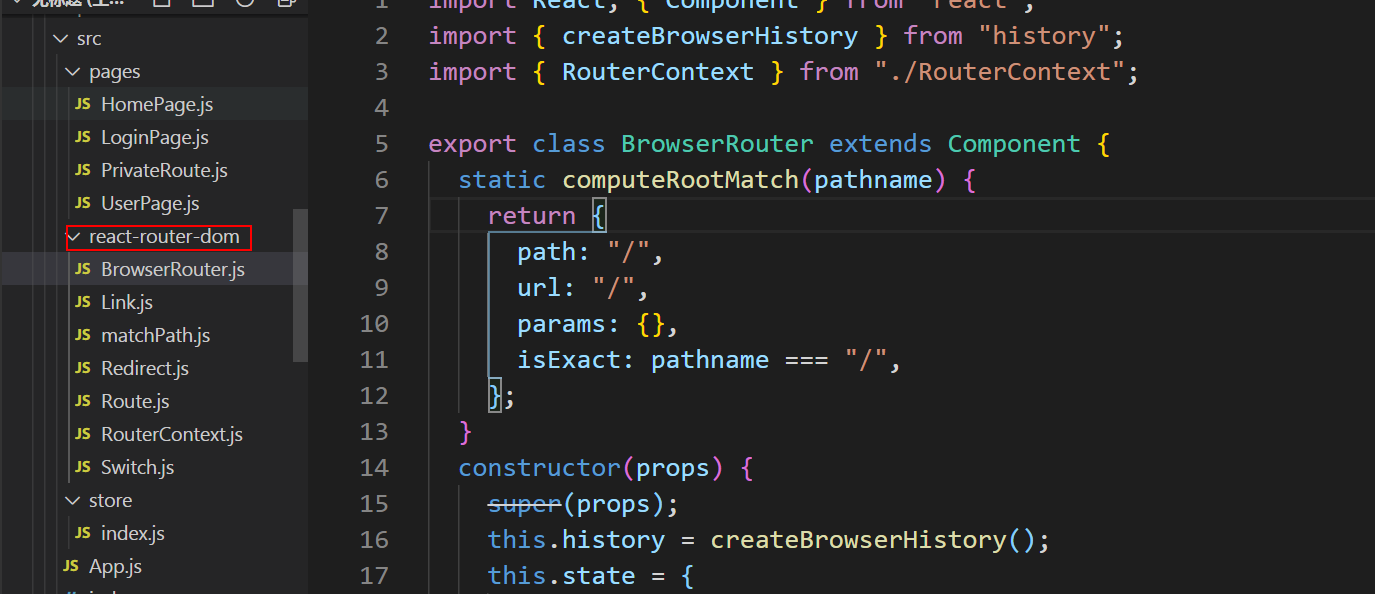
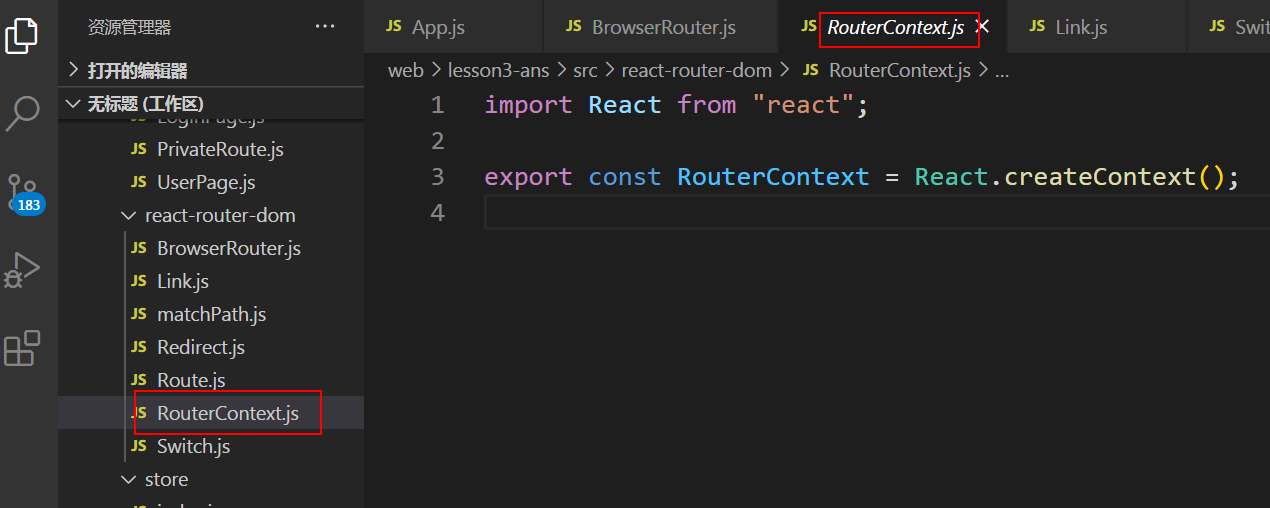
RouterContext
传递BrowserRouter的内容
BrowserRouter
import React, { Component } from "react";
// react-router-dom的库
import { createBrowserHistory } from "history";
import { RouterContext } from "./RouterContext";

export class BrowserRouter extends Component {
  // 拼接match,保证switch有初始值,同时可以在router匹配404页面(没写path的route)
  static computeRootMatch(pathname) {
    return {
      path: "/",
      url: "/",
      params: {},
      isExact: pathname === "/",
    };
  }
  constructor(props) {
    super(props);
    // history可以拿到当前路由,跳转路由...,并且兼容性强
    this.history = createBrowserHistory();
    this.state = {
      location: this.history.location,
    };
    // 监听路由切换
    this.unlisten = this.history.listen((location) => {
      // 设置state,后面传递给子组件
      this.setState({ location });
    });
  }
  // 组件卸载解除监听
  componentWillUnmount() {
    if (this.unlisten) {
      this.unlisten();
    }
  }
  render() {
    return (
      <RouterContext.Provider
        value={{
          history: this.history,
          location: this.state.location,
          match: BrowserRouter.computeRootMatch(this.state.location.pathname),
        }}
      >
        {this.props.children}
      </RouterContext.Provider>
    );
  }
}
Link
import React, { Component } from "react";
import { RouterContext } from "./RouterContext";

export default class Link extends Component {
  handleClick = (event, history) => {
    event.preventDefault();
    history.push(this.props.to);
  };
  render() {
    const { to, children } = this.props;
    return (
      <RouterContext.Consumer>
        {(context) => (
          <a
            href={to}
            onClick={(event) => this.handleClick(event, context.history)}
          >
            {children}
          </a>
        )}
      </RouterContext.Consumer>
    );
  }
}
Route
简化版
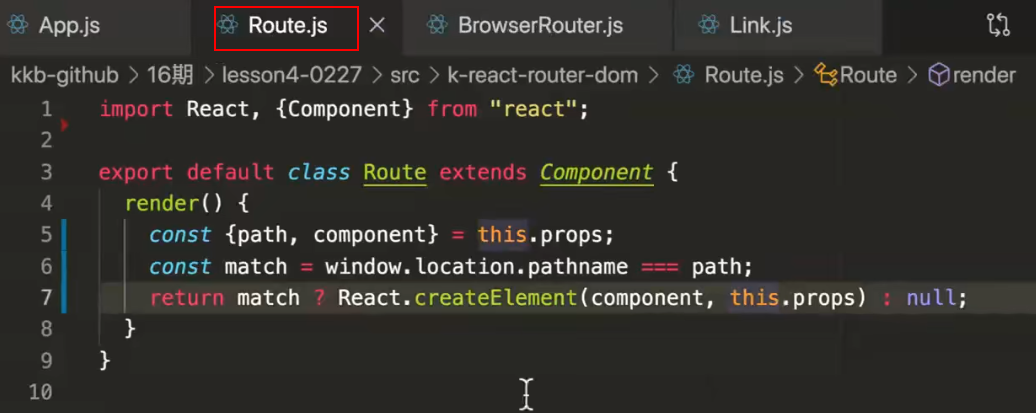
加强版
import React, { Component, Children } from "react";
import { RouterContext } from "./RouterContext";
import matchPath from "./matchPath";

export default class Route extends Component {
  render() {
    return (
      <RouterContext.Consumer>
        {(context) => {
          const {
            path,
            computedMatch,
            children,
            component,
            render,
          } = this.props;
          // const match = context.location.pathname === path;
          const location = this.props.location || context.location;
          // matchPath对path的拼接转对象操作,match优先从props拿
          const match = computedMatch
            ? computedMatch
            : path
            ? matchPath(location.pathname, this.props)
            : context.match;
          const props = {
            ...context,
            location,
            match,
          };
          //  children, component, render 能接收到(history, location match),
          // 所以我们定义在props,传下去

          // match 渲染children, component, render 或者null
          // match的时候如果children存在:function或者children本身
          // 不match children 或者 null
          // children是和匹配无关

          /**
           * match?(
           *  // children存在的情况
           *  children ? (typeof children === 'function' ? children(props): children)
           *  // children不存在的情况,判断component,component不存在判断render,最后都不存在为null
           * :(component ? (React.createElement(component,props)) : (render ? render(props) : null)
           *
           * ):(typeof children === 'function' ? children(props):null)
           */
          return (
            <RouterContext.Provider value={props}>
              {match
                ? children
                  ? typeof children === "function"
                    ? children(props)
                    : children
                  : component
                  ? React.createElement(component, props)
                  : render
                  ? render(props)
                  : null
                : typeof children === "function"
                ? // 这里的children不管是否匹配match都可以存在,这里能不能直接返回,就不判断了?
                  // match匹配: children是function或者是节点
                  // 不match:不匹配,只有children是function才执行匹配
                  children(props)
                : null}
            </RouterContext.Provider>
          );
        }}
      </RouterContext.Consumer>
    );
  }
}
switch
import React, { Component } from "react";
import { RouterContext } from "./RouterContext";
import matchPath from "./matchPath";

export default class Switch extends Component {
  render() {
    return (
      <RouterContext.Consumer>
        {(context) => {
          // 优先用props上的location
          const location = this.props.location || context.location;
          // 找出渲染的,第一个符合匹配的元素,存在element
          let element,
            match = null;
          let { children } = this.props;
          // children里都是匹配的Route
          React.Children.forEach(children, (child) => {
            // match为空表示还没匹配,并且合法
            if (match === null && React.isValidElement(child)) {
              element = child;
              // child的path是否存在
              const path = child.props.path;
              match = path
                ? // 返回一个对象
                  matchPath(location.pathname, {
                    ...child.props,
                    path,
                  })
                : // 上一级帮我们存的
                  context.match;
            }
          });

          return match
            ? React.cloneElement(element, {
                location,
                computedMatch: match,
              })
            : null;
        }}
      </RouterContext.Consumer>
    );
  }
}
Redirect
import React, { Component } from "react";
import { RouterContext } from "./RouterContext";
export default class Redirect extends Component {
  render() {
    return (
      <RouterContext.Consumer>
        {(context) => {
          const { history } = context;
          const { to } = this.props;
          // history.push(location)
          // 跳转到to
          return <LifeCycle onMount={() => history.replace(to)} />;
        }}
      </RouterContext.Consumer>
    );
  }
}
class LifeCycle extends Component {
  componentDidMount() {
    if (this.props.onMount) {
      this.props.onMount.call(this, this);
    }
  }
  render() {
    return null;
  }
}
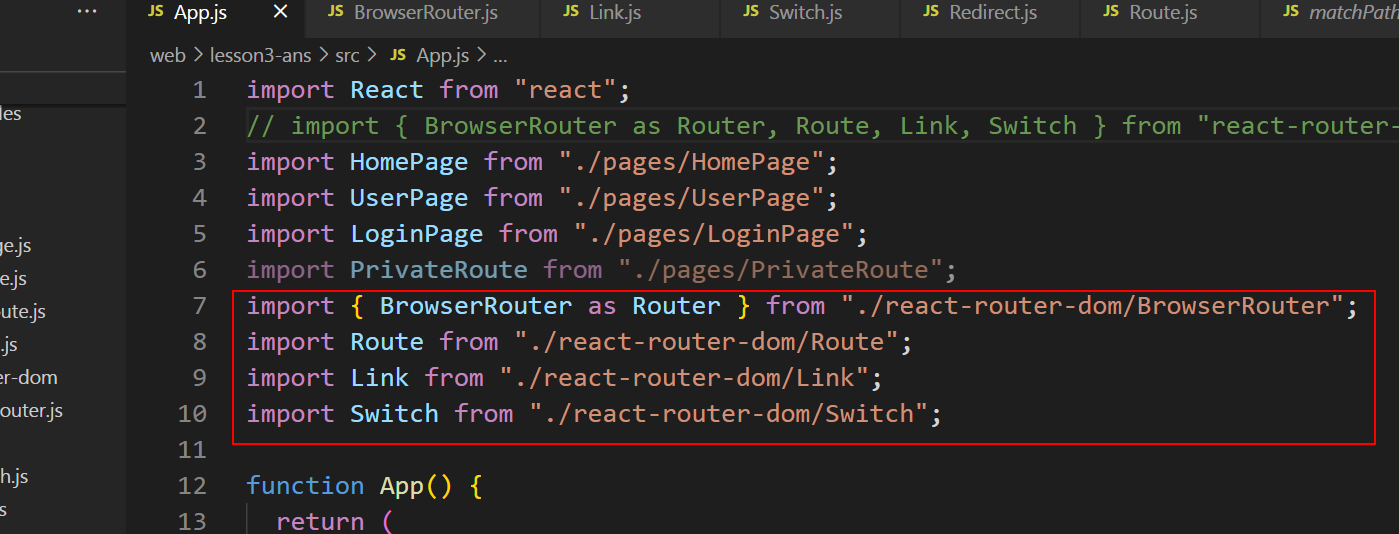
测试代码:
app.js
导入
路由
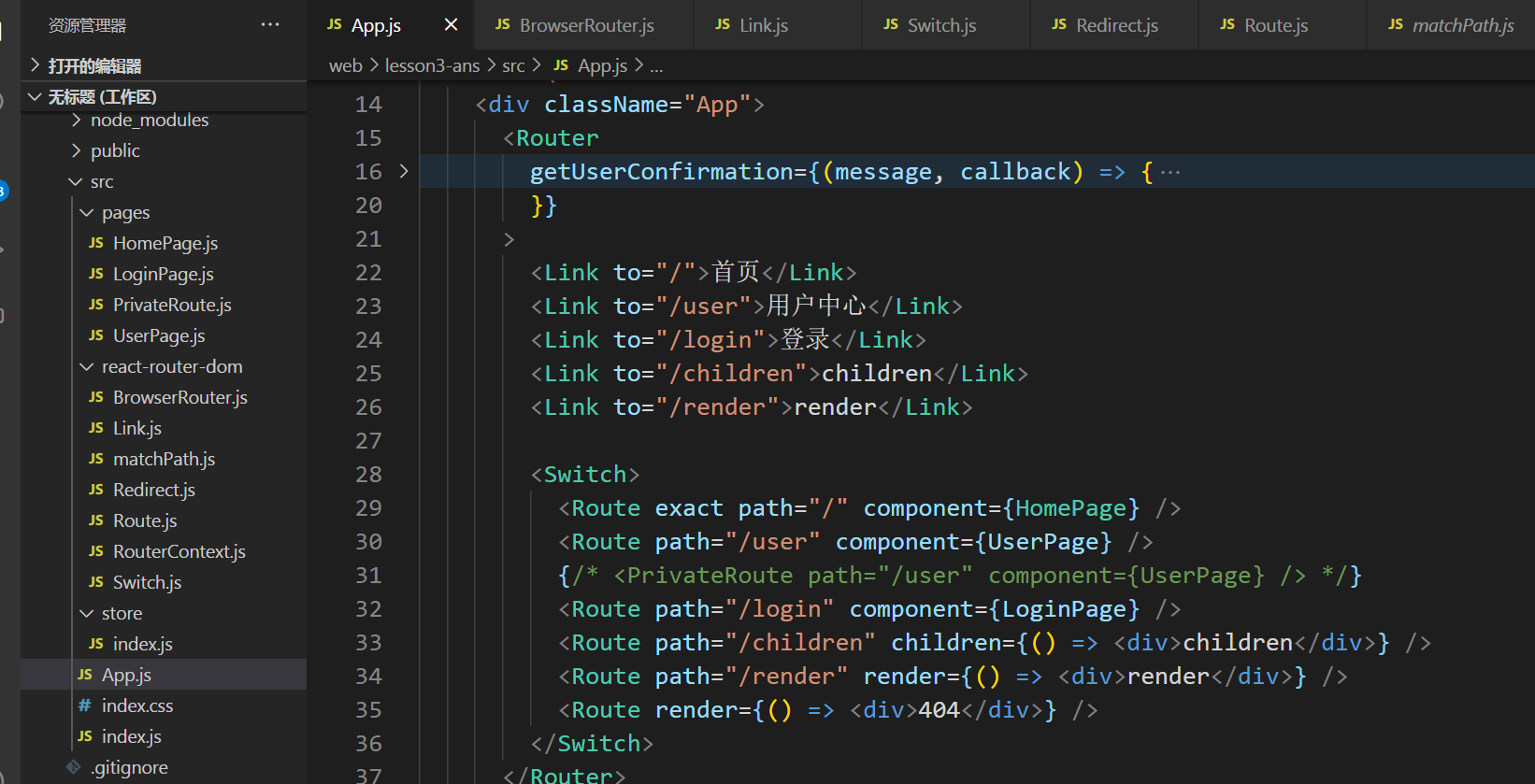
页面
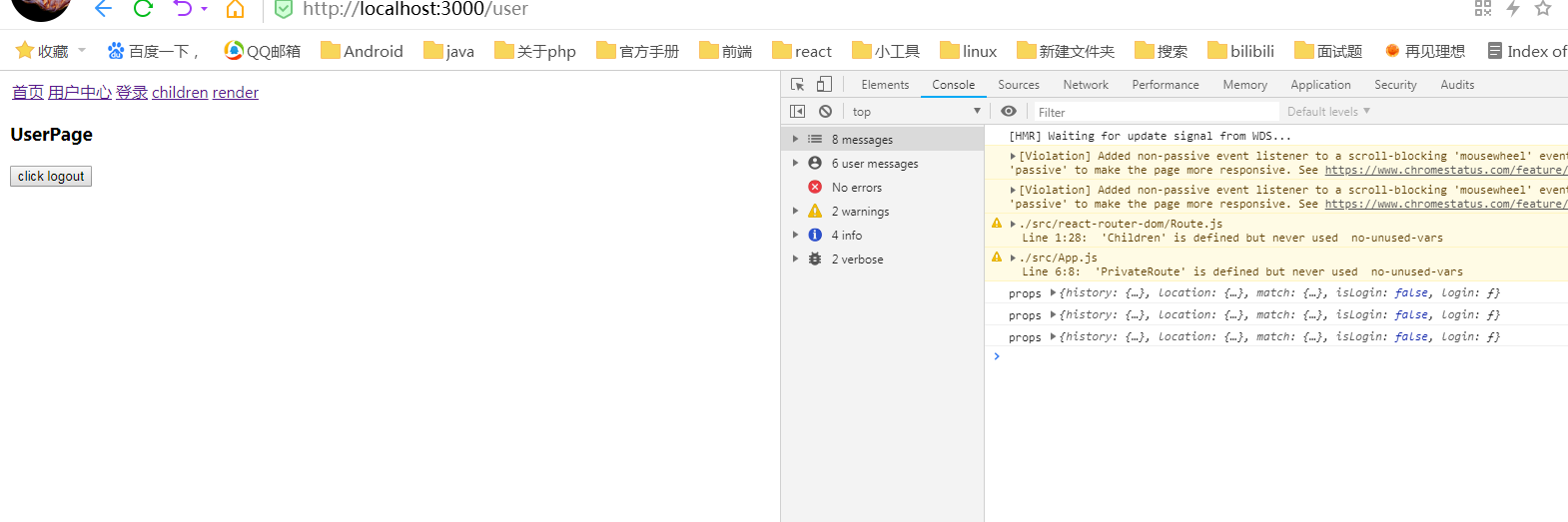
附录:matchPath.js
import pathToRegexp from "path-to-regexp";

const cache = {};
const cacheLimit = 10000;
let cacheCount = 0;

function compilePath(path, options) {
  const cacheKey = `${options.end}${options.strict}${options.sensitive}`;
  const pathCache = cache[cacheKey] || (cache[cacheKey] = {});

  if (pathCache[path]) return pathCache[path];

  const keys = [];
  const regexp = pathToRegexp(path, keys, options);
  const result = { regexp, keys };

  if (cacheCount < cacheLimit) {
    pathCache[path] = result;
    cacheCount++;
  }

  return result;
}

/**
 * Public API for matching a URL pathname to a path.
 */
function matchPath(pathname, options = {}) {
  if (typeof options === "string" || Array.isArray(options)) {
    options = { path: options };
  }

  const { path, exact = false, strict = false, sensitive = false } = options;

  const paths = [].concat(path);

  return paths.reduce((matched, path) => {
    if (!path && path !== "") return null;
    if (matched) return matched;

    const { regexp, keys } = compilePath(path, {
      end: exact,
      strict,
      sensitive
    });
    const match = regexp.exec(pathname);

    if (!match) return null;

    const [url, ...values] = match;
    const isExact = pathname === url;

    if (exact && !isExact) return null;

    return {
      path, // the path used to match
      url: path === "/" && url === "" ? "/" : url, // the matched portion of the URL
      isExact, // whether or not we matched exactly
      params: keys.reduce((memo, key, index) => {
        memo[key.name] = values[index];
        return memo;
      }, {})
    };
  }, null);
}

export default matchPath;
Ценники на вывоз мусора сейчас космос, любые лайфхаки по экономии в тему.
1xbet onlayn kazino platforması ilə vaxtınızı daha səmərəli və maraqlı keçirin. Saytın canlı kazino bölməsi istifadəçilərə fərqli bir dünya təklif edir. Burada canlı dilerli kazino oyunlarının hər bir növünü sınaqdan keçirə bilərsiniz. Krupyelərin peşəkarlığı oyunun dinamikasını və marağını artırır. Müntəzəm olaraq yenilənən oyun siyahısı cansıxıcılığa yol vermir. Hesabınızı artırmaq üçün onlarla fərqli və etibarlı üsul mövcuddur. Qazanılan pullar cəmi bir neçə dəqiqə ərzində şəxsi hesabınıza köçürülür. Aktiv fəaliyyətinizə görə fərdi bonuslar və hədiyyələr qazana bilərsiniz. Dəstək xidməti həm çat, həm də e-poçt vasitəsilə kömək göstərir. 1xbet ailəsinə qoşulun və böyük uduşlar üçün ilk addımı atın. onlayn kazino
我一直梦想, 看到你们相册那样的地方。真棒。
我喜欢, 这里分享真实经验。你的项目 就是 属于这里的。请继续。
我热爱这样的想法, 去那么多国家。真的很鼓舞。
能感受到热爱。继续保持 感受。
我关注这样的资源, 写得很实在。你的网站 就是 属于这里的。加油。
1
1
1